
MYOB Assist app
Admin's out. AI's in. Send invoices and quotes on the go and snap and claim receipts. Unlock these features with the all-new MYOB Assist app.



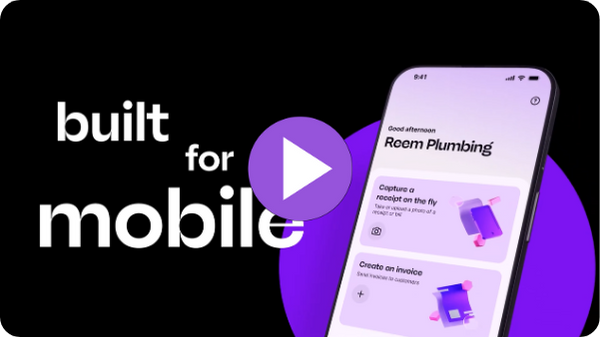
Made for on-the-go invoicing, quoting and expense capture
No matter where your business takes you, let the new MYOB Assist app come along to do the heavy lifting. It’s a faster, more efficient way to manage these everyday tasks and keep your business moving.

Included in your subscription
Free for you and your team to use as part of your MYOB subscription.

AI category recommendations
Your in-app activity feeds AI smart matching in the browser.

Replaces MYOB Capture & Invoice apps
MYOB Assist replaces the MYOB Capture and MYOB Invoice apps in Australia in 2026.

Invoice at the speed of need
- Create, edit, and send professional invoices in just a few taps or save to send later.
- Add your products or services, share a custom message, and deliver invoices instantly.
- Stay in control of your cash flow by tracking who’s paid at a glance and sending quick payment reminders right from your phone.
Quote instantly, close faster
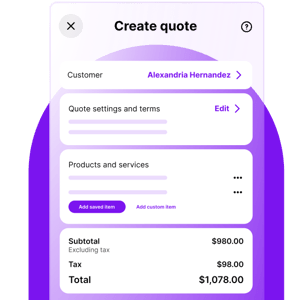
Create, manage and send quotes on the go, then instantly send them via email. Watch how it works and see how easy it is to turn accepted quotes into invoices — so you can spend more time doing the job, not chasing one.
Quotes is available to those with the following roles: Owners, Administrators and Sales.

No receipt left behind
Quickly snap a pic of a receipt, or use an existing photo of one, crop it and add a note if you wish.
To action the captured receipt, you can then jump into MYOB in a web browser to see your upload. You can choose to attach to an existing expense transaction, or use the smarts in MYOB to scan the pic to automatically fill in the details in a new transaction.
Got a team on the road? They can use MYOB Assist to capture and upload receipts — while you stay in full control of what they can see.
Quoting
Quote in real time. Scope the work, cost it, and share the quote before you’ve left the customer.
Assign Contact role for receipt capture only
MYOB Assist now lets your team upload receipts without needing full user access.
Multi-page receipt capture
You can now scan multi-page receipts and invoices. No more "one page at a time".
Introducing services invoice layout
Create and edit invoices for service-based work, with full editing available later in AccountRight and MYOB Business if needed.
SMS invoicing with secure payments*
Send invoices by SMS with a secure payment link so customers can view and pay instantly.
*For online-payments-enabled customers only.
Open last business file on login
Toggle this on to automatically reopen the last file you worked in — no need to search for it each time.
See how we’ve helped our customers

“I can scan a receipt the moment I get it - straight into MYOB. It’s quick, accurate and keeps me organised.”
Brett Engeman
Founder, Aspirational Leaders Co.

"MYOB Assist is very easy to navigate. It saves us time in the office as it streamlines the software that we use.”
Riley Collins
Montville Mist Springwater
MYOB Capture and Invoice apps are retiring this year
After you’ve downloaded MYOB Assist, you can safely remove the Capture and Invoice apps from your device. Rest assured, you won’t lose any data — it’s all securely stored online in your MYOB Business file.
Both the Capture and Invoice apps will be retired this year in Australia and are no longer available for download from app stores. They'll continue to be available in New Zealand.

Learn more about the retirement of MYOB Capture app.

Learn more about the retirement of MYOB Invoice app.
Who can use the MYOB Assist app?
MYOB Assist is compatible with Australian MYOB subscribers with:
- MYOB Business (Lite & Pro)
- AccountRight Online
- Connected Ledger (invoicing features are not available with this plan).
The app requires an internet connection. It is not compatible with:
- AccountRight Offline files
- Payroll Only plans
AccountRight accounts that are accessed online and offline will experience some syncing limitations meaning it may not deliver the best experience.
How do I get setup or find help with MYOB Assist?
Sign in using your MYOB account credentials and complete any multi-factor authentication steps.
For assistance, visit the MYOB Help Centre or contact MYOB Support for troubleshooting and best practice guides.
Is multi-factor authentication (MFA) required for MYOB Assist?
Yes. Signing in to the app uses the same MYOB login credentials and MFA steps as your web account. This strengthens account security and compliance.
Can MYOB Assist work offline?
No. MYOB Assist is designed for live, real-time syncing with the cloud. While you may see previously viewed information, full functionality requires an active internet connection.
How does my role or access level affect use of MYOB Assist?
- Access is based on your MYOB role and user permissions.
- Admins can add/remove users and manage access via the web browser only (not in the app).
- If your user is inactive or the business subscription expires, app access will be blocked or limited to view-only.
Can I customise invoice templates in MYOB Assist?
No. Invoice templates cannot be customised within the app. They are set up in MYOB via the web browser; the app uses the default template saved in your file.
Where do receipts captured in the app go?
Receipts captured via the MYOB Assist app are uploaded to MYOB Uploads (known as In Tray in AccountRight). Manage receipts in the browser to:
- Create new bills
- Link to existing bills
- Match to bank transactions
Can I process payroll or create pay runs in MYOB Assist?
No. Payroll features are not available in MYOB Assist at this time. Existing payroll functions remain web-only.
Does MYOB Assist support multiple businesses or files?
You can switch between multiple businesses or files you have access to from within the app, provided each is compatible with the MYOB Assist app. Unsupported files will prompt an in-app message.
What AI capabilities will MYOB Assist app have now, and in the future?
At launch, MYOB Assist facilitates AI-powered document processing to analyse receipts and invoices synced from the mobile app straight to your browser. Over time, MYOB Assist will expand to include a range of agentic AI capabilities — unlocking smarter workflows, evolving category suggestions, and empowering you to supercharge every aspect of your MYOB experience.
What AI features in the browser support expense capture and invoicing workflows started in the MYOB Assist app?
Initially, expense capture will be fuelled by intelligent document processing, enabled by GenAI in browser.
AI-powered invoice and receipt scanning – MYOB Assist facilitates AI-powered document processing to analyse receipts and invoices synced from the mobile app straight to your browser.
AI category recommendations – Category suggestions match transactions based on previous activity in the browser. Simply approve, review and reconcile. The AI model adapts to your past actions, getting smarter and more accurate the more you use it.
Future plans for the app are AI feature-rich and we look forward to sharing the vision with you soon.
What devices are compatible with MYOB Assist?
The app is available for iOS iPhone and Android devices. Minimum supported OS versions may apply—check your app store for requirements.
Why can’t I send an invoice PDF via SMS/iMessage from my iPhone?
Some iPhones running iOS 15 or later have a known Apple issue that can block PDF attachments from sending through the Messages app — whether you’re sending to:
- A non‑Apple device (Android) or
- Another iPhone/iPad
You may see a “Message Failed to Send” or “Not Delivered” error, even with MMS Messaging turned on in your settings. This is an Apple behaviour and is not caused by the MYOB Assist app.
Why this happens
- Apple’s Messages app uses iMessage for Apple‑to‑Apple and SMS/MMS for Apple‑to‑non‑Apple.
- In recent iOS versions, PDF file attachments sometimes fail to send through either method, depending on device and OS version.
- iPhones running iOS 15 and later (most commonly reported on iPhone 13 models and newer)
- Can affect sending to both Apple and non‑Apple devices
If you encounter this issue, try:
- Emailing the invoice directly from MYOB Assist instead of using Messages.
- Sending a secure invoice link instead of attaching the PDF.
- Using a chat app (WhatsApp, Messenger, Telegram, etc.) that supports PDFs.
Note: MYOB cannot change this behaviour — it is controlled by Apple. You can share feedback directly with Apple here: Product Feedback.
Can I submit feedback or request features for MYOB Assist?
Yes. Inside the app, find the community forum section in the settings menu to submit feedback, report issues, or suggest new features.
* For customers with online payments enabled only. Applications for online payments are subject to approval. Fees apply: $0.25 per transaction + 1.8% of total invoice. Fees are inclusive of GST and will be automatically passed on to your customers unless you turn off surcharging. Payment accepted via Visa, Mastercard, AMEX, Apple Pay, Google Pay and PayPal. You can also choose to enable BPAY but cannot pass on a surcharge to customers who pay via BPAY. View terms and conditions here.